GNARBOX Selects2.6.3
Publisher Description
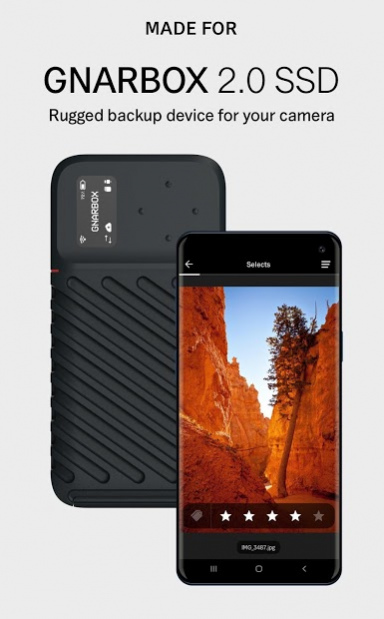

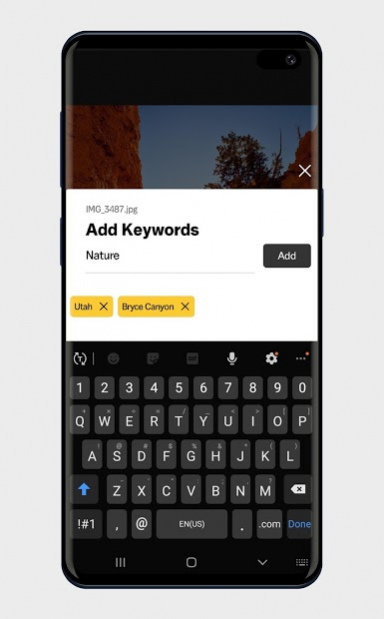
*This app requires pairing with GNARBOX 2.0 SSD hardware.*
Selects provides super-fast RAW image preview and easy-to-use tools to mark your selects, manage metadata, and save time preparing your shots for edit.
Photographers often spend hours culling photos after shoots. The Selects app is designed to streamline the process of narrowing your content down. By giving you the tools you need to get a jumpstart on reviewing and culling, returning to your studio for the creative edit feels legitimately seamless.
• Powered by Photo Mechanic®: Quickly review RAW images on memory cards, external storage drives, or your GNARBOX 2.0 SSD.
• Star Ratings and Keywords: Mark your images with star ratings and keywords that carry over into industry-standard editors like Lightroom or Photo Mechanic.
• Folder and Thumbnail View: Browse your files and folders with intuitive navigation controls.
——
*What is GNARBOX?*
GNARBOX 2.0 SSD is a rugged backup device for pro content creators who need the most reliable way to back up their files in the field. Unlike other storage solutions, its compact design and powerful on-board backup features make it effortless to manage files without a laptop. With up to 1TB internal SSD, SD slot, two USB-C ports, and mobile apps to complete essential workflow steps before arriving to the studio, GNARBOX will save you time and make you a more reliable creator.
About GNARBOX Selects
The company that develops GNARBOX Selects is MyGnar, Inc.. The latest version released by its developer is 2.6.3. This app was rated by 1 users of our site and has an average rating of 4.0.
To install GNARBOX Selects on your Android device, just click the green Continue To App button above to start the installation process. The app is listed on our website since 2020-10-01 and was downloaded 88 times. We have already checked if the download link is safe, however for your own protection we recommend that you scan the downloaded app with your antivirus. Your antivirus may detect the GNARBOX Selects as malware as malware if the download link to com.tomahawk.selects is broken.
How to install GNARBOX Selects on your Android device:
- Click on the Continue To App button on our website. This will redirect you to Google Play.
- Once the GNARBOX Selects is shown in the Google Play listing of your Android device, you can start its download and installation. Tap on the Install button located below the search bar and to the right of the app icon.
- A pop-up window with the permissions required by GNARBOX Selects will be shown. Click on Accept to continue the process.
- GNARBOX Selects will be downloaded onto your device, displaying a progress. Once the download completes, the installation will start and you'll get a notification after the installation is finished.
Program Details
System requirements
Download information
Pricing
Version History
version 2.6.3
posted on 2020-10-01
Features:
- Use xxHash64 as checksum default
- New Mechanism for updating GNARBOX: Update using SD card with the option to format media partition
Fixes:
- Fix bug where OLED shows "." for external storage devices
- Prevent incorrect SmartBackup setting for copies
- Eliminate edge case that could cause OLED screen to go black
- Avoid checksum failures due to identical files with different file names
- Prevent crash when scrolling past the end of video timeline
version 2.6.0
posted on 2020-06-16
Features:
- Frame.io Integration
- Cloud Upload Manager: ability to upload content to Dropbox & Frame.io account with detailed Upload Report in Task Manager
- Scaling Pinch Zoom for Photos
- xxHash64 Checksum: an additional option for quicker verification
- MHL Logs: option to generate .mhl file on every backup
- Ability to mount APFS drives
- Increased USB-C File Transfer Performance
Fixes:
- Various security and stability improvements
version 2.5.3
posted on 2020-01-16
. Ability to perform Dropbox Uploads
. Dropbox Uploads can be canceled from the Task Manager
Bug Fixes
. Fixes crash when selecting the quick action menu for the Dropbox Upload folder
. Fixes intermittent crash when manually entering a new static IP or switching to an automatic IP Address
version 2.5.1
posted on 2019-12-20
. Seamless integration with Network Attached Storage devices via SMB File Sharing
. On-Board Backup enhancements
. Charging via USB-C-equipped computers during Mass Storage Mode
. Metadata writes to XMP Sidecar files
. Persisting Tag and Rating indicators in the Selects Workspace
. Ability to save images to Android Gallery
. Ability to remove or delete unwanted files
Bug Fixes
. Timeout during some Dropbox cloud uploads
. Resolves some GNARBOX boot issues with automatic software stack reset
version 2.4.2
posted on 2019-10-23
Features
. N/A
Fixes
. Improved connection stability when using GNARBOX in Home Mode
version 2.4.1
posted on 2019-10-07
Features:
- Includes mechanism for resetting the software stack through via Settings menu
Fixes:
- Preview support for .jpeg files
- ListView stability
version 2.4.0
posted on 2019-09-23
Fixes:
- Preview support for .jpeg files
- ListView stability
version 2.2.3
posted on 2019-07-30
Welcome to GNARBOX 2.0
